Skill Assessment: overview
For: admins, assessment designers and evaluators
Skill Assessment is a separate module for testing what a candidate can do — speak, write, explain, handle a customer, solve a case — rather than only what they can recall. Every question is tagged to one or more skills and scored against a rubric, so the result is a per-skill profile instead of a single mark.
Availability: Skill Assessment is enabled per institute. If you do not see Skill Assessment in the side menu, contact [email protected] to enable it.
What makes it different from a normal exam
| Area | Normal exam | Skill Assessment |
|---|---|---|
| Question bank | Question Bank > Objective / Subjective Questions | Skill Assessment > Question Builder (own question list) |
| How candidates answer | Options, typed answer, file upload | MCQ, text, audio recording, video recording, or a spoken conversation with an AI bot |
| How answers are scored | Answer key or examiner marks | Weighted skills and rubric criteria (CEFR, NSQF or your own) |
| Result | Total marks | Per-skill profile, plus total score |
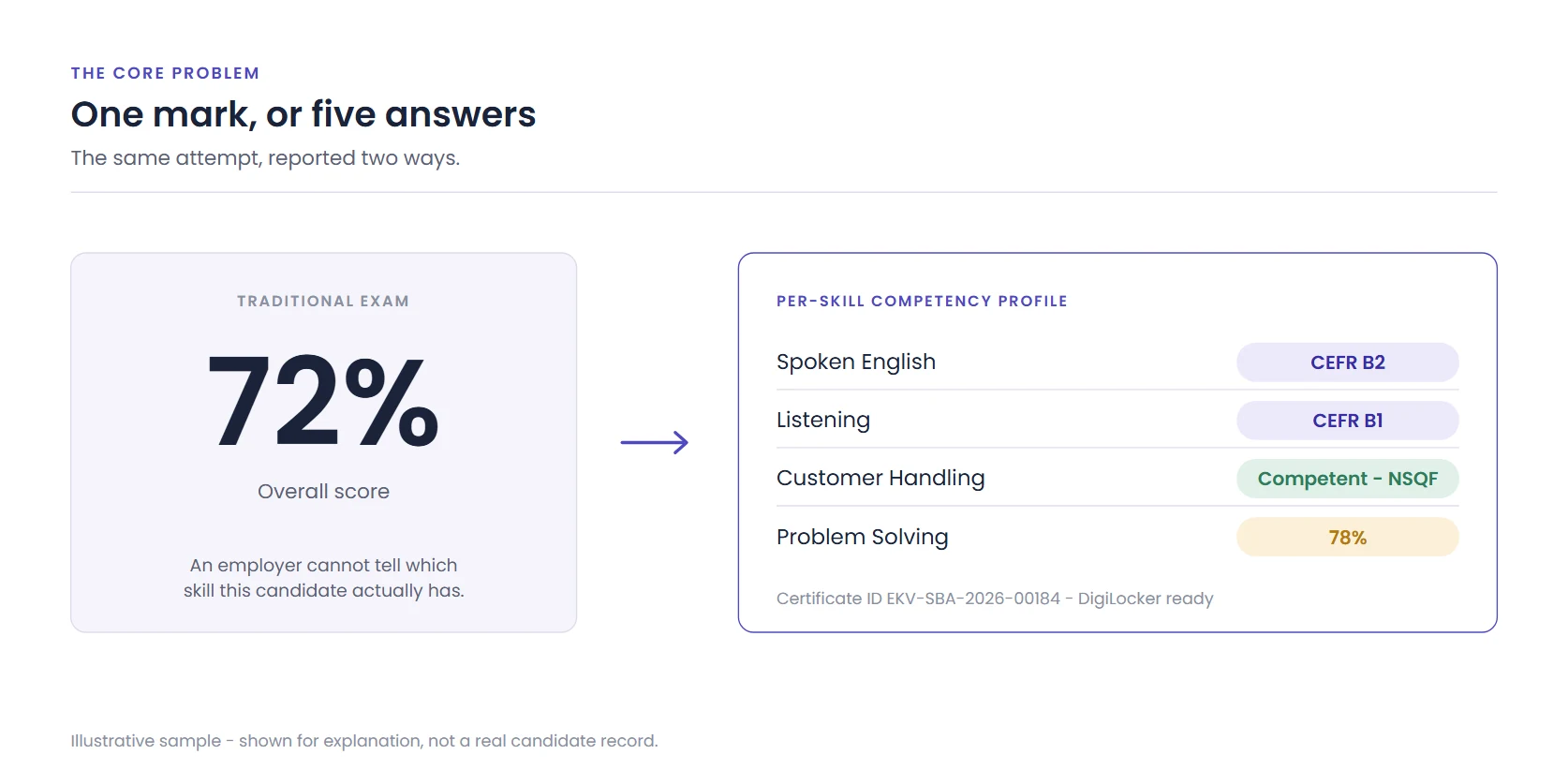
A single score hides which skill is weak; a per-skill profile shows it.
Question and answer formats
- Question format (what the candidate sees): Text, Video, Audio or Image. An optional case study / background can be shown alongside the question.
- Answer format (how the candidate responds):
- MCQ — single or multiple selection, with an answer key or option-wise marks.
- Text — typed answer with optional minimum / maximum word limits.
- Audio — spoken answer with a maximum duration, target language and re-record rule.
- Video — recorded video answer with a maximum duration and re-record rule.
- Conversation — a multi-turn spoken dialogue with an AI bot (persona, number of turns, language, voice).
Rubrics and scoring frameworks
| Framework | What it is | Best for |
|---|---|---|
| CEFR | Common European Framework of Reference for Languages. Scores map to a band from Pre-A1 to C2. | Spoken and written language questions |
| NSQF | National Skills Qualifications Framework (India). Criteria come from the job role's National Occupational Standards; scores map to a level from 1 to 8. | Vocational and job-role questions |
| Custom | You write every criterion and weight yourself; the score is reported as a percentage. | Internal competencies, subject-specific checks |
Each question carries one or more skills (weights total 100%) and each skill carries named rubric criteria (weights total 100%).
AI scoring with human review
Open-ended answers are evaluated by AI against the question's rubric and mapped to the framework level. Responses the AI is not confident about, or that look extreme, are routed to a human reviewer, who can accept or override the AI score before the result profile is published.
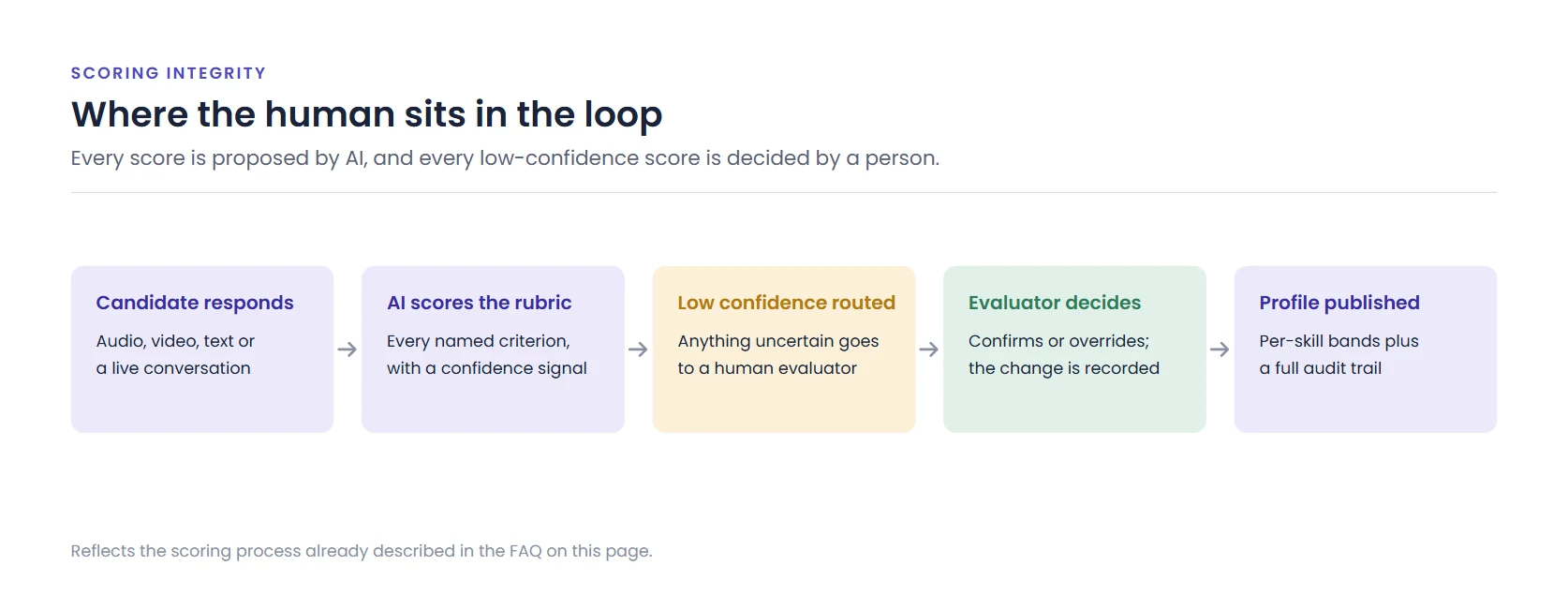
AI scores against the rubric; low-confidence responses go to a human reviewer.
End-to-end workflow
- Build questions in Skill Assessment > Question Builder, or import / generate them with AI Import. See Create questions with Question Builder and AI Import.
- Create the assessment in Skill Assessment > Assessment Creation: pick questions, arrange sections, set delivery, proctoring and results options. See Create, configure and schedule an assessment.
- Schedule it from Manage Schedule on the assessment row (Flexi, Fixed, or Flexi with Fixed Exam Time).
- Candidates take it in full screen. Share Taking a Skill Assessment (candidate guide) with them beforehand.
- Review and publish scores, then share per-skill reports and certificates.
Related
Need help? Email [email protected] with your institute name, the exam or question ID and a screenshot. You can also connect over phone or schedule a meeting.
Was this article helpful?
That’s Great!
Thank you for your feedback
Sorry! We couldn't be helpful
Thank you for your feedback
Feedback sent
We appreciate your effort and will try to fix the article